
Best getscanmenu.com Alternatives for U.S. Restaurants


TL;DR:
Most U.S. restaurants should consider Mydigimenu as a comprehensive alternative to getscanmenu.com because it offers full integration of digital menus, online ordering, and POS connectivity with managed onboarding. Lighter, view-only QR code options are suitable for operators needing only menus or dietary filters without operational features. Selecting the right platform depends on your ordering model, POS ecosystem, and support requirements, with infrastructure reliability being more critical than feature count.
For most U.S. restaurants replacing getscanmenu.com, Mydigimenu is the recommended pick. It pairs QR and tablet menus with POS-ready online ordering, pay-at-table, loyalty programs, and managed onboarding — all under one account. When a lighter-weight option fits better, the category picks below point you in the right direction.
Quick shortlist by category:
Best all-in-one for U.S. restaurants: Mydigimenu — full-stack QR, tablet, ordering, loyalty, reservations, and POS integrations with managed onboarding
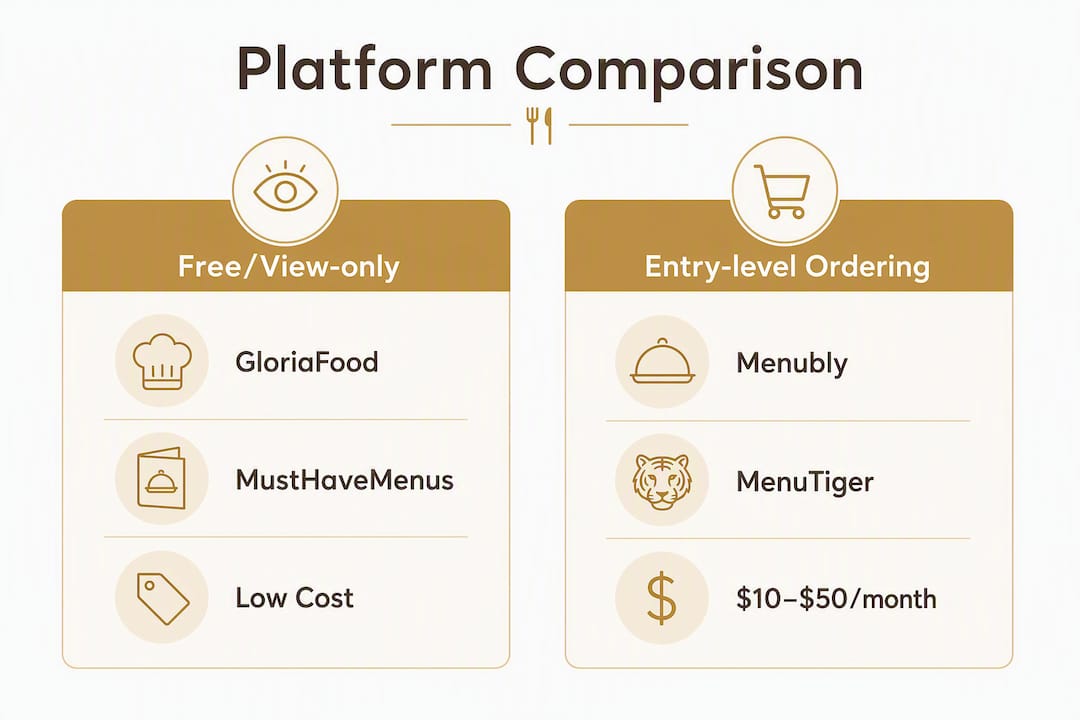
Best free/view-only choice: Free-tier QR menu platforms (GloriaFood, MustHaveMenus) — great for operators who only need a digital menu card, no ordering
Best for tablet/iPad-first dining: SpotMenus — focused on in-room tablet presentation; limited ordering depth
Best for multi-location/enterprise operations: Mydigimenu or enterprise-tier platforms — supporting multi-location licensing, multiple languages and currencies, and CRM capture
Best for AI-powered dietary filtering: Parsley AI or similar AI menu scanner apps — allergen alerts and dish recommendations, not a full ordering platform
Best for budget-first single locations: Menubly or MenuTiger entry tiers — basic QR menus offered with affordable monthly prices suitable for single-location operations
The right choice turns on three things: your ordering model, your POS ecosystem, and how much onboarding support you need. Platforms tracked on aggregators like SaaSHub consistently flag POS connectivity and backend reliability as the deciding factors — not feature count. PCI DSS compliance matters the moment you process payments, so any platform handling transactions must meet that standard before you go live.
Table of Contents
What do the best getscanmenu.com alternatives actually offer?
Not every platform in this category does the same job. The table below maps the major solution types against the criteria that matter most to U.S. operators.

Best for | Core features | POS integrations | Pricing shape | Ease of setup | Support model | Security / PCI |
Full-service restaurants needing ordering + loyalty | QR menu, online ordering, tablet/iPad menu, pay-at-table, loyalty, reservations, CRM | Direct-integrated partners + middleware (e.g., Square, Clover, Toast-compatible APIs) | Subscription tiers + transaction fees on gift vouchers | Managed onboarding; 1–3 weeks typical | Dedicated account support; SLA-backed | PCI DSS-aligned payment flows |
Cafes / quick-service wanting free view-only menus | QR menu (view-only), basic item management | None or minimal | Free tier; paid for ordering | Self-serve; hours to days | Email/chat support | No payment handling |
Tablet/iPad-first fine dining | Tablet menu presentation, item photos, modifiers | Limited; often middleware-dependent | Mid-range subscription | Self-serve with templates | Standard support | Varies by payment add-on |
Mid-market operators adding online ordering | QR + online ordering, basic loyalty | Cloud-first POS APIs (Square, Lightspeed) | $30/month + transaction fees | Semi-managed | Email + onboarding docs | PCI-compliant payment gateway |
Multi-location chains / hotels | Multi-location licensing, multi-language, CRM, delivery integrations | Enterprise POS APIs + direct delivery platform hooks | Enterprise subscription + per-location fees | Managed; dedicated project lead | Account manager + SLA | Full PCI DSS + data privacy controls |
AI/scan-specialist dietary tools | Allergen alerts, dietary filters, dish recommendations, translation | None (consumer-facing apps) | Free tier; paid premium | App download; minutes | In-app / community | Not applicable (no payments) |
A note on POS partner types: Cloud-first POS systems (Square, Clover, Lightspeed) typically offer open APIs that most ordering platforms can connect to directly. Legacy on-premise POS systems (older Aloha, Micros installations) often require middleware, which adds cost and a potential point of failure. Direct-integrated partners mean the platform has a certified, tested connection — middleware means a third-party relay sits in between. Always ask which type applies to your setup.
Key differentiators to watch:
Platforms with direct POS integrations reduce order-routing errors and eliminate manual re-entry
Free-tier tools are fine for view-only menus but rarely support pay-at-table or loyalty without a paid upgrade
AI/scan tools serve a different job entirely — dietary filtering and translation, not operational ordering
How do you choose the right getscanmenu.com alternative?
Choose based on three primary axes: your operational model (dine-in, delivery, or hybrid), your POS ecosystem, and your onboarding and support needs. Everything else is secondary.
Questions to ask every vendor during a demo
Which POS systems do you support, and are those direct integrations or middleware?
What is your documented uptime SLA, and how do you handle outages?
Are you PCI DSS compliant for card-present and card-not-present transactions?
Can I apply custom branding — colors, logo, fonts — across all menu surfaces?
Does the menu still display in read-only mode if the internet goes down?
What transaction fees apply beyond the monthly subscription?
How is multi-location licensing structured — per location, per region, or flat?
Criteria ranked by importance
POS compatibility — a beautiful menu is useless if orders don’t reach your kitchen
Ordering model fit — dine-in QR, delivery, pay-at-table, or all three
Payment handling and PCI compliance — non-negotiable the moment real money moves
Onboarding timeline — how quickly can you go live without disrupting service?
Feature maturity — loyalty, reservations, and CRM are table stakes for full-service operators
Pricing transparency — subscription cost plus transaction fees plus per-location charges
Red flags to walk away from
Vague answers about which POS systems are “supported” with no named partners or proof
No PCI compliance statement anywhere on the vendor’s site or in their documentation
No documented data export process (you need your menu data back if you ever leave)
A demo environment that doesn’t work or a free trial that requires a credit card with no clear cancellation terms
Realistic cost expectations: QR code menu platforms typically have low monthly fees for basic view-only tiers; adding ordering, payments, and loyalty features involves extra subscription and transaction costs. Budget for the full stack, not just the QR generator. A single-location setup can often go live within a couple of weeks; multi-location rollouts with POS testing may require several weeks.
Pro Tip: During a vendor demo, ask them to process a real test order through your actual POS system — not a sandbox. If they can’t demonstrate a live order flowing from the QR menu to your kitchen display, the integration isn’t ready for your restaurant.
What should you expect when switching from getscanmenu.com?
Expect a 1–6 week timeline depending on your number of locations and POS complexity. A single-location cafe with a cloud POS can be live in one to two weeks. A multi-location group with a legacy on-premise system should plan for four to six weeks.
Migration checklist
Export your current menu data — request a CSV or PDF export from getscanmenu.com before canceling; most platforms accept structured imports
Map categories, modifiers, and tax rules — modifier groups and tax configurations rarely transfer cleanly; audit them manually
Test POS mapping in a staging environment — confirm every menu item routes to the correct kitchen printer or display before going live
Set up your payment flow and verify PCI compliance — run test transactions and confirm your payment gateway is certified
Soft-launch on a subset of tables — activate QR codes on two or three tables first; let staff and guests surface any issues before full rollout
Train front-of-house and kitchen staff — even a 30-minute walkthrough reduces day-one friction significantly
Typical migration timeline
Stage | Single location | Multi-location (3+ sites) |
Menu export and data prep | a few days | several days |
Platform setup and branding | a couple of days | several days |
POS mapping and testing | several days | up to two weeks |
Payment setup and PCI check | about a day | several days |
Soft-launch (subset of tables) | a few days | several days per site |
Staff training | a few hours | one to several days per site |
Total estimated window | 1–2 weeks | 4–6 weeks |
Common pitfalls and how to avoid them:
Menu formatting mismatches: Rich text descriptions and special characters often break during import — clean your menu data in a spreadsheet before uploading
Tax rule mapping errors: State and local tax rates must be configured per location; don’t assume the platform auto-detects them
Broken QR assets: Old getscanmenu.com QR codes will stop working; reprint table tents and update any printed materials before launch day
Staff resistance: Involve your team in the soft-launch; staff who feel consulted adopt new tools faster than those who are handed them
Pro Tip: Before full cutover, run a complete payment cycle — place an order, process a card, confirm the ticket prints in the kitchen, and verify the transaction appears in your POS reporting. Catching a broken step here costs you nothing; catching it during a Friday dinner rush costs you everything.
Which platform type fits your restaurant best?
Mydigimenu — recommended for most U.S. operators
Mydigimenu is a full-stack digital menu platform built for restaurants, cafes, bars, and hotels that need more than a static QR code. The platform covers QR menus, tablet and iPad menus, online ordering without app downloads, pay-at-table, reservation management, loyalty programs with digital stamp cards, guest profile capture via social login, CRM integration, targeted marketing, digital gift vouchers, nutritional information, multi-language and multi-currency support, and third-party POS and delivery platform integrations.
Standout capabilities:
QR and tablet/iPad menus with high-quality food video support
Pay-at-table and online ordering under one account
Loyalty stamp cards and targeted marketing campaigns
Guest feedback collection and CRM capture
Multi-location licensing and multi-language/currency menus
Managed onboarding with dedicated support
Best for: Full-service restaurants, hotel dining, multi-location groups, and any operator who wants ordering, payments, and marketing managed from a single platform.
Pricing shape: Subscription tiers with transaction fees on gift voucher sales; pricing details in USD are available on the Mydigimenu site.
Pros: Deep feature set, managed onboarding, POS-ready integrations, rich media menu support, global currency and language options.
Cons: More setup investment than a free view-only tool; operators who only need a static digital menu may find the full feature set more than they require right now.
Pro Tip: If you run a hotel with multiple dining outlets, Mydigimenu’s multi-language and multi-currency support means one platform can serve your rooftop bar, your lobby café, and your in-room dining menu — without managing three separate subscriptions.
Free/view-only QR menu platforms (e.g., GloriaFood, MustHaveMenus)
These tools let you publish a digital menu guests can scan and browse — nothing more. GloriaFood offers a free online ordering layer on top of its menu builder, while MustHaveMenus focuses on design-forward menu templates. Neither delivers the operational depth of a full-stack platform.
Best for: Cafes, pop-ups, and food trucks that need a polished digital menu card fast and have no immediate need for integrated ordering or loyalty.
Pricing shape: Free tiers available; paid plans for ordering features.
Pros: Fast setup, low cost, no POS dependency.
Cons: No pay-at-table, no loyalty, limited POS integrations, no CRM.
Entry-level QR + ordering platforms (e.g., Menubly, MenuTiger)
A step up from view-only tools, these platforms add basic online ordering and QR code generation. MenuTiger’s pricing sits in the $10–$50/month range for core features, making them accessible for single-location operators on tight budgets.
Best for: Single-location quick-service restaurants or cafes adding digital ordering for the first time.
Pricing shape: $10–$50/month; transaction fees may apply on ordering tiers.
Pros: Affordable, quick to set up, covers the basics.
Cons: Limited POS integrations, minimal loyalty or marketing features, support is typically self-serve.
AI/scan-specialist tools (e.g., Parsley AI, Happy Munch)
Parsley AI offers instant ingredient analysis, allergen alerts, dietary filters, and dish recommendations — with a free core tier. Happy Munch and similar apps emphasize offline scanning and 50+ language support with limited free scans and paid premium tiers. These are consumer-facing tools, not operational platforms.

Best for: Restaurants whose guests have complex dietary needs, or operators who want to add a dietary-filter layer without rebuilding their menu system.
Pricing shape: Free tiers; paid premium for unlimited scans or advanced features.
Pros: Excellent for allergen and dietary use cases; fast to deploy.
Cons: No ordering, no POS, no payments — a complementary tool, not a replacement for a full platform.
Why Mydigimenu is the recommended replacement for most U.S. restaurants
Mydigimenu earns the top recommendation because it solves the full operational problem — not just the menu display piece. Replacing getscanmenu.com with a view-only QR tool trades one limitation for another. What U.S. operators actually need is a platform where the menu, the order, the payment, and the guest data all connect.
Feature callouts that matter in daily operations:
POS connectivity: Orders route directly to your kitchen without manual re-entry
Offline fallback: Menus remain viewable even when connectivity drops
Tablet/iPad menu support: Ideal for fine dining and hotel in-room dining setups — explore the tablet menu capabilities for a closer look
Pay-at-table: Guests settle the bill from their phone; staff focus on hospitality
Reservation management: Table booking integrated with the same platform managing your menu
Loyalty programs: Digital stamp cards that keep guests coming back
Multi-language and multi-currency: One platform for every outlet, every market
CRM and guest data capture: Social login profiles feed your marketing campaigns
Onboarding is managed, not self-serve. Mydigimenu provides migration support, staff training guidance, and documented SLA expectations — so the switch doesn’t land on your team’s plate alone. For operators evaluating digital ordering workflows, the platform’s ability to unify dine-in and delivery under one account is a genuine operational advantage.
The strongest getscanmenu.com replacements are platforms that moved beyond simple menu digitization to become backend operational tools — managing online ordering, dine-in, and delivery under one account. Infrastructure reliability and POS connectivity matter far more than an exhaustive feature checklist. A platform with 50 features and an unstable POS connection will cost you more in lost orders than a focused platform with 20 features that works every time. — SaaSHub analysis on Scan Menu alternatives
What do user reviews say about these platforms?
Reputation signals matter when you’re committing to a platform that will touch every table in your restaurant. Across aggregators like SaaSWorthy and G2, the patterns are consistent: operators reward platforms that deliver reliable POS sync and responsive support, and they punish those that promise integrations they can’t actually deliver.
GloriaFood earns strong marks for its free tier and ease of setup, but reviews frequently note its limitations once a restaurant scales beyond basic ordering. SpotMenus gets credit for visual presentation on tablets but draws criticism for shallow POS support. Menubly and MenuTiger score well on affordability and speed of deployment for single-location operators.
The review pattern that should concern any buyer: platforms with glowing initial reviews that turn negative at the six-month mark. That inflection point usually signals a POS integration that worked in demos but broke under real-world load, or a support team that was responsive during onboarding and disappeared afterward. Customer reviews in hospitality carry real weight — both for your guests rating your restaurant and for you rating the platforms you rely on.
When evaluating reputation, look beyond star ratings. Read the one- and two-star reviews specifically for mentions of POS failures, data loss, or billing disputes. Those are the operational risks that don’t show up in a demo.
How much can you customize your menu’s look and feel?
Branding consistency matters more than most operators realize at the selection stage. A menu that looks like a generic template undercuts the visual identity your team has built across every other guest touchpoint.
The range across platform categories is wide. Free and entry-level tools typically offer color and logo customization, but the underlying template structure is fixed. Mid-market and full-stack platforms like Mydigimenu support custom colors, fonts, logo placement, high-quality food photography, and food video embeds — so the menu feels like an extension of your restaurant’s personality, not a third-party app.
Mydigimenu’s QR and eMenu platform supports rich media layouts, meaning a mouthwatering video of your signature dish can play directly in the menu before a guest orders. That kind of presentation influences decisions in a way a text list never will. For hotels managing multiple dining concepts under one roof, the ability to apply distinct branding per outlet — while keeping everything on one platform — is a practical advantage that saves both time and money.
What to look for in customization:
Custom domain or subdomain for your menu URL
Logo, color palette, and font control
High-resolution photo and video support per menu item
Nutritional and allergen information fields
Multi-language menu display without separate builds
White-label options for agencies or hotel groups managing multiple brands
Operators who treat menu design as an afterthought often discover, post-launch, that their digital menu looks nothing like their physical one. Build branding requirements into your vendor checklist from day one.
Key Takeaways
Mydigimenu is the recommended getscanmenu.com replacement for most U.S. restaurants because it combines QR and tablet menus, POS-ready ordering, managed onboarding, and loyalty under one account — while lighter-weight category picks suit operators who only need a view-only menu or a dietary-filter tool.
Point | Details |
POS compatibility is the deciding factor | Choose a platform with named, direct POS integrations — not vague “supports most POS” claims. |
Budget for the full cost stack | Basic QR menu platforms run $10–$50/month; ordering, payments, and loyalty add subscription and transaction fees on top. |
Plan a 1–6 week migration window | Single locations can go live in one to two weeks; multi-location rollouts with POS testing need four to six weeks. |
Match the tool to the job | AI/scan tools handle dietary filtering and translation well; full-stack platforms handle ordering, payments, and CRM. |
Mydigimenu covers the full operational stack | QR menus, tablet ordering, pay-at-table, loyalty, reservations, POS integrations, and managed onboarding — all under one account. |
The real risk in picking a getscanmenu.com replacement
Most operators spend their evaluation time comparing feature lists. The smarter move is to stress-test infrastructure. A platform can list 40 features on its pricing page and still fail you on a busy Saturday night if its POS connection drops or its payment gateway times out.
The vendors that consistently earn long-term loyalty from restaurant operators are the ones that treat the backend as seriously as the front-end experience. That means documented uptime SLAs, named POS partners with certified integrations, and a support team that picks up the phone when something breaks at 7 PM on a Friday.
There’s also a subtler risk: choosing a platform that’s right for today but wrong for where your restaurant is heading. A free view-only tool is fine for a pop-up. It’s a liability for a growing multi-location group that will need CRM data, loyalty tracking, and delivery integrations within 18 months. The migration cost of switching platforms twice is always higher than investing in the right one the first time.
One practical tip worth carrying into every vendor conversation: ask to see a live order flow through your actual POS, not a demo environment. If the vendor hesitates or redirects to a sandbox, that hesitation is your answer.
Mydigimenu is ready when you are
Mydigimenu gives U.S. restaurant operators a concrete alternative to getscanmenu.com — not just a prettier QR code, but a full platform covering ordering, payments, loyalty, and POS integrations with managed onboarding from day one. The difference between a platform that looks good in a demo and one that performs under real service pressure is infrastructure, and that’s where Mydigimenu is built to deliver.

What to bring to your demo:
Your current menu as a PDF or CSV export
Your POS system name and version (cloud or on-premise)
Your highest-priority workflows (dine-in ordering, delivery, pay-at-table, loyalty)
A list of your locations and any multi-language requirements
The demo will walk through live QR menu setup, POS connection testing, payment flow, and loyalty configuration — so you leave with a clear picture of what going live actually looks like for your operation. View pricing in USD before the call so you can ask specific questions about the tier that fits your volume. Ready to see it in action? Book a free demo and bring your real menu data — the session is most useful when it’s built around your actual operation.
Useful sources for your evaluation
SaaSHub — Scan Menu Alternatives: Aggregated list of alternatives with scoring and integration notes; useful for a quick competitive landscape scan before demos.
SaaSWorthy — Scan Menu Product Page: Review aggregator with user scores and integration rankings; check here for peer reviews and updated feature comparisons.
MenuTiger — QR Code Menu Cost Guide: Breaks down the real cost of QR menu platforms beyond the QR code itself; essential reading before finalizing a budget.
Parsley AI: AI-powered dietary filter and allergen tool with a free tier; relevant if guest dietary needs are a primary driver of your platform search.
MenuPics — Best AI Menu Apps: Roundup of AI menu scanning apps by job type; helps clarify when a scan-specialist tool is the right fit versus a full-stack platform.
Mydigimenu QR Menu page: The primary QR menu product page — covers QR generation, view-only and ordering modes, and free-plan options.
Mydigimenu Tablet/iPad Menu: Product landing for tablet and iPad menu capabilities; relevant if in-room or tableside ordering is a priority.
Mydigimenu Pricing (USD): Full plan and pricing breakdown in U.S. dollars; review before your demo to frame the right-tier conversation.
Digital Reservations Explained: External perspective on how digital reservation systems integrate with dining platforms; useful for hotel and resort operators evaluating reservation features.
Recommended
So many options out there, but not all are worth your time. Check out this tool for breeding info if you're into Palworld; could save some headaches. Pal Breed
Choosing a QR menu platform that integrates smoothly with the POS and can scale with the business is so important. Testing real order flows before committing is great soflo wheelie life advice.
Some games test your speed, while wheelie life tests your patience and precision. The moment the front wheel rises, every second becomes an exciting battle against gravity. Realistic controls make each ride feel authentic and rewarding. Every completed run helps you understand the motorcycle a little better. Stay determined, trust your instincts, and keep chasing longer wheelies. The next challenge is already waiting.