
Best DigitalQR.menu Alternatives for Restaurants in 2026

TL;DR:
Web-native menus support search engine indexing and improve guest discovery beyond seated diners.
Full-featured platforms like Mydigimenu integrate online ordering, guest analytics, and dynamic QR codes, offering a comprehensive solution.
Mydigimenu is the recommended full-featured alternative to DigitalQR.menu for most U.S. restaurants, offering web-native menus, dynamic QR codes, POS integrations, online ordering, and guest analytics in a single platform. If you need a faster shortlist, here are the top four picks by use case:
Best all-around: Mydigimenu (web-native, ordering, analytics, multilingual, loyalty)
Best for low cost or free start: POS-integrated free QR generators (e.g., Square’s free tier)
Best for fast PDF conversion: PDF-to-QR conversion services (live within hours)
Best for deep POS integrations: POS-native digital menu systems
Digital menus now reach an 85% adoption rate among U.S. restaurants post-COVID, so the question is no longer whether to go digital but which platform actually fits your operation. The key technical standard to verify with any vendor is whether they support dynamic QR codes, meaning you can update the destination URL without reprinting table cards. Jump to the comparison table below for a side-by-side view.
Table of Contents
How do the main DigitalQR.menu alternatives compare?
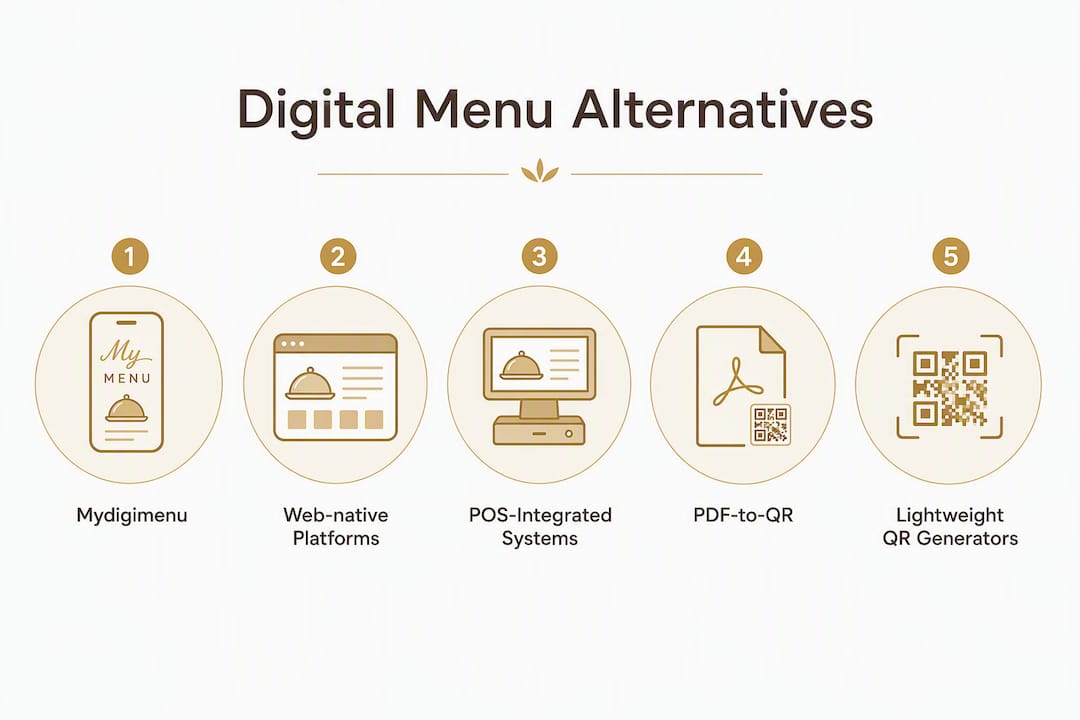
Option | Best for | Free plan? | Starting price | Ordering / POS | Design & customization | Mobile UX | Analytics / guest capture | QR / NFC | Support |
Mydigimenu ⭐ Recommended | Full-service restaurants, multi-location groups | Yes (free tier) | Paid plans from published tiers | Online ordering, POS connectors, delivery integrations | Custom layouts, food video, branding | Web-native, indexable | Guest capture, CRM, loyalty | Dynamic QR + NFC | Onboarding support |
Web-native digital menu platforms | Design-forward cafes, boutique hotels | Sometimes | $0–$30/mo | Limited or none | Templates, themes | Web-native, indexable | Basic page views | Dynamic QR | Self-serve docs |
POS-integrated menu systems | Operators already on a major POS | Yes (POS-tied) | $0 with POS plan | Deep POS + payments | POS-branded, limited | Web or app, varies | Order data only | Dynamic QR | POS vendor support |
PDF-to-QR converters | Fast migration, small cafes | Often free | $0–$10/mo | None | None (PDF as-is) | PDF (not indexable) | None | Static or dynamic | Minimal |
Lightweight QR generators | Pop-ups, food trucks, events | Yes | $0–$15/mo | None | Minimal | Varies | None or minimal | Static or dynamic | Community / email |
Mydigimenu balances cost, integration depth, and speed of setup better than any single-purpose alternative. The main trade-off operators face is this: free or low-cost tools get you live fast but leave gaps in ordering, guest capture, and analytics that you will pay for later in lost revenue and manual workarounds.
Profiles of the top alternative approaches
Understanding the categories at a deeper level helps you match the right tool to your actual operation, whether you run a single neighborhood cafe or a multi-location full-service group.
1. Mydigimenu (publisher recommended)
Mydigimenu is a full-stack digital menu SaaS built specifically for hospitality. Guests scan a QR code and land on a web-native menu page, no app download required. The platform supports online ordering, pay-at-table, POS and delivery platform integrations, loyalty programs with digital stamp cards, guest profile capture via social login, and multilingual menus with multi-currency support.
Best for: Full-service restaurants, hotel F&B, multi-location groups, and any operator who wants a single platform for menus, ordering, and guest engagement.
Web-native menus are indexable by Google, turning your menu into a local discovery asset
Dynamic QR codes allow instant menu updates and scheduled mode switches (lunch/dinner) without reprinting table cards
Guest capture, CRM, and loyalty tools create a direct marketing channel
Food video support and customizable layouts make dishes genuinely mouthwatering on screen
Supports tips, modifiers, tax and gratuity, and U.S. payment processors
Considerations: More features mean a slightly longer initial setup than a bare-bones QR generator. The free tier covers basic menu display; ordering and advanced analytics sit on paid plans.
Technical notes: Menus are fully web-native and indexable. Dynamic QR supported. NFC supported. POS connector list available on request.

2. Web-native digital menu platforms
These are standalone platforms focused on presenting a beautiful, mobile-optimized menu page. They typically offer design templates, theme customization, and QR code generation, with the menu hosted on a web URL that Google can crawl.
Best for: Design-forward cafes, wine bars, boutique hotels, and venues where visual presentation is the priority and ordering happens at the counter or through staff.
Web-native pages load faster on mobile, support images, and allow analytics tracking
Templates and themes let non-designers build a polished menu quickly
Some platforms support multiple menus (brunch, dinner, cocktails) under one QR code
Considerations: Most do not support online ordering or POS integration. Guest capture and analytics are usually limited to page views. If your operation grows, you will likely outgrow the platform.
Technical notes: Web-native and indexable. Dynamic QR typically supported. NFC support varies. No ordering or payment processing.
3. POS-integrated menu systems
Major POS providers increasingly bundle a free QR menu generator with their restaurant plans. Square’s free QR menu tool, for example, integrates directly with Square Payments and can assign QR codes to specific service areas so orders create digital tickets in the POS automatically.
Best for: Operators already committed to a specific POS ecosystem who want the simplest possible integration path.
Zero additional cost if you are already on the POS plan
Order data flows directly into existing POS reporting
Table or service-area QR assignment is usually built in
Considerations: Customization is limited to what the POS vendor allows. Switching POS later means rebuilding your menu setup. Guest capture and loyalty features are typically thin or absent. The free tier often omits features restaurants later need, so test the actual free limits before committing.
Technical notes: Menu UX varies by POS vendor (web or app). Dynamic QR usually supported. NFC support rare. Analytics tied to POS order data only.

4. PDF-to-QR conversion services
These services take your existing PDF menu and host it behind a QR code, sometimes converting it to a web page in the process. Some advertise turnaround times as fast as 32 hours for operators who want a fast, low-effort migration.
Best for: Small cafes or pop-ups that want to go contactless immediately with minimal effort and zero redesign.
Fastest path from paper menu to QR code
No design work required if your PDF is already polished
Often free or very low cost
Considerations: A hosted PDF is not indexable by Google and offers no ordering, analytics, or guest capture. You also cannot update the menu without re-uploading the PDF. This is a starting point, not a long-term solution.
Technical notes: PDF-based (not web-native, not indexable). Static or dynamic QR depending on service. No NFC. No ordering or analytics.
5. Lightweight standalone QR generators
Product Hunt’s alternatives catalog lists dozens of small vendors and specialized tools in this category. These are simple tools that generate a QR code pointing to a URL you provide, with minimal menu-building features.
Best for: Food trucks, pop-ups, market stalls, and events where you need a QR code fast and your menu rarely changes.
Extremely fast setup, often under five minutes
Free tiers widely available
No ongoing platform dependency
Considerations: No ordering, no analytics, no guest capture, and no design tools. Static QR codes mean reprinting every time your menu URL changes. Not suitable for any operation that needs to update menus regularly or capture guest data.
Technical notes: Menu UX depends entirely on the destination URL you set. Static QR common; dynamic QR available on paid tiers. No NFC. No SEO value unless you control the destination page.
6. Design-focused web-native menu apps
Platforms like Menoq sit between a full-stack solution and a basic QR generator. They focus on design templates and brand customization while keeping the menu web-native and mobile-rendered. Think of them as the middle ground for venues that want a polished look without the complexity of a full ordering system.
Best for: Specialty coffee shops, food trucks with strong brand identity, and casual dining venues that want a beautiful menu but do not need ordering or loyalty features.
Mobile-native rendering with branded themes
Faster to set up than a full-stack platform
Web-native pages support basic SEO
Considerations: Limited or no ordering, POS integration, or guest capture. Customization depth is narrower than a full platform. Growth will require a platform migration.
Technical notes: Web-native and indexable. Dynamic QR typically supported. No NFC. No ordering or payment processing.
7. NFC and alternative contactless technologies
For specific use cases, NFC tags, Bluetooth beacons, and Data Matrix codes each offer advantages over QR codes. NFC is particularly well-suited to luxury dining experiences where a tap feels more elegant than a scan. Bluetooth beacons work well for proximity-triggered promotions in larger venues.
Best for: Fine-dining restaurants, luxury hotels, and venues where the physical table experience matters as much as the digital one.
NFC tap is faster and more intuitive for guests unfamiliar with QR scanning
Bluetooth beacons can trigger contextual content without any guest action
Data Matrix codes work in low-light or damaged-surface environments
Considerations: NFC requires hardware investment (NFC-enabled table tags or coasters). Bluetooth beacons add infrastructure complexity. Neither replaces a full digital menu platform; they are delivery mechanisms, not menu systems.
Technical notes: Destination is still a web URL or app; the menu platform behind it determines indexability and features. Mydigimenu supports NFC alongside QR.
How to choose the right alternative for your restaurant
Work through these checks in order before committing to any platform. Most vendors offer a free trial; use it to verify the specifics below rather than relying on marketing copy.
Clarify your must-have integrations. List your current POS, payment processor, and any delivery platforms (DoorDash, Uber Eats, etc.). Ask each vendor for their written connector list before signing up.
Confirm web-native indexability. Open the demo menu URL in a browser. If it loads a PDF or redirects to an app store, it is not indexable. Run site:vendordomain.com in Google to check for indexed menu pages.
Test mobile UX on your actual devices. Load the menu on an Android and an iPhone. Check load speed, image quality, and how modifiers and item descriptions render.
Evaluate free plan limits honestly. Free tiers often cap menu items, remove ordering, or add vendor branding. Test the exact features your operation needs, not the headline “free” claim.
Trial the full ordering flow. Place a test order, apply a modifier, add a tip, and check that the ticket appears correctly in your POS or notification system.
Check analytics and guest capture. Can you see which items guests view most? Can you capture an email or phone number at checkout? These are the data points that turn a menu into a marketing channel.
Verify dynamic QR behavior. Change the menu destination URL in the platform dashboard and confirm the existing QR code redirects correctly. Dynamic QR codes let you update the destination without reprinting, which is critical for seasonal menus and daily specials.
Confirm U.S. payment processor compatibility. Verify support for Stripe, Square, or your preferred processor. Ask specifically about tip prompts, tax configuration, and gratuity handling.
Review contract terms and cancellation policy. Ask for written confirmation of data ownership, export options, and cancellation notice periods before going live.
Pricing ranges for U.S. restaurants (monthly starting points):
Full-stack platforms (ordering + analytics + loyalty): $30–$100+/mo, plus transaction fees on some plans
Web-native design-focused platforms: $0–$30/mo, no ordering
POS-integrated free tiers: $0 (bundled with POS subscription)
PDF-to-QR converters: $0–$10/mo
Lightweight QR generators: $0–$15/mo
Red flags to watch for:
Menu content locked behind a proprietary app (guests must download to view)
No dynamic QR editing after publishing
Unclear PCI/SSL compliance documentation
Opaque cancellation terms or no data-export option
No support for U.S. payment processors, tip prompts, or item modifiers
Pro Tip: Request a 30-day pilot before signing an annual contract. Ask the vendor to share their POS connector list in writing and confirm that you own your guest data and can export it at any time. These two questions alone will surface most of the hidden limitations.
Why web-native menus give you a discovery edge
A PDF behind a QR code serves guests who are already seated. A web-native menu page does something fundamentally different: it can be crawled and indexed by Google, which means a guest searching “best pasta near me” or “brunch menu downtown Austin” might land on your menu before they ever set foot in your restaurant.
Web-native menu pages load faster on mobile, support images, and allow analytics that a PDF simply cannot match. When a guest scans your QR code and lands on a fast, image-rich web page, the experience feels intentional rather than improvised. That first impression shapes the order.
Checklist to verify your menu’s indexability:
Open the menu URL directly in a browser (not via QR scan) and confirm it loads as a web page, not a PDF or app redirect
Check the page’s robots.txt and meta robots tags for “noindex” directives
Search a unique dish name in Google using the site:yourdomain.com operator
Look for your menu in Google’s local pack results for relevant “near me” queries
Confirm that food images have descriptive alt text and that the page passes Google’s Core Web Vitals
Small SEO improvements compound quickly. Adding structured menu markup (Schema.org’s Menu and MenuItem types), writing descriptive alt text for food images, and keeping mobile load times under three seconds can meaningfully increase organic discovery. Review and update your menu markup every time you change the menu, not just at launch.
Pro Tip: A single dynamic QR code that switches between your lunch and dinner menus by time of day means you never reprint table cards when the menu rotates. Platforms that support scheduled menu switching, like Mydigimenu, make this a one-time setup rather than a recurring operational task.
Key Takeaways
Mydigimenu is the strongest full-featured alternative to DigitalQR.menu for U.S. restaurants that need web-native menus, dynamic QR, ordering, and guest analytics in one platform.
Point | Details |
Web-native beats PDF | Only web-native menus are indexable by Google and can drive new guest discovery via search. |
Dynamic QR is non-negotiable | Verify dynamic QR support before committing; static codes require reprinting every menu update. |
Free tiers have real limits | Free plans from POS providers often omit ordering, guest capture, and analytics — test before committing. |
Match platform depth to operation size | Lightweight QR generators fit pop-ups; full-stack platforms fit multi-location or full-service restaurants. |
Mydigimenu for full-service operators | Mydigimenu covers ordering, POS integrations, loyalty, and guest capture in a single platform for U.S. restaurants. |
The fastest rollout is rarely the most obvious one
The operators who get the most out of a new digital menu platform are not the ones who launch fastest. They are the ones who pilot on two or three tables first, watch how guests actually interact with the menu, and fix the friction points before rolling out to the full floor.
The most overlooked step in any rollout is staff training, not on the technology but on how to guide guests to the QR code naturally. A small table tent with a clear “Scan to order” prompt and a brief verbal cue from the server removes 80% of the hesitation guests feel the first time they encounter a QR menu.
For measuring success in the first 30 days, track three numbers: orders placed per table via QR, average ticket size compared to your pre-digital baseline, and the conversion rate from menu views to completed orders. If conversion is low, the problem is usually menu design or load speed, not the platform itself. A well-designed digital menu with high-quality food images and clear item descriptions consistently outperforms a plain text list, regardless of the platform behind it.
One practical tip that most operators discover too late: set up scheduled menu switching on day one. A single dynamic QR that automatically serves your lunch menu until 3:00 PM and your dinner menu after that eliminates a daily manual task and prevents guests from seeing the wrong prices during service transitions.
Mydigimenu gives U.S. restaurants a full-featured starting point
Most operators evaluating digital menu alternatives are choosing between speed and capability. PDF converters get you live in hours but leave you with a static, non-indexable file. Lightweight QR generators are free but offer nothing beyond a redirect. POS-bundled tools work well inside their ecosystem but rarely extend to loyalty, guest capture, or multilingual support.
Mydigimenu is built for operators who want all of it without stitching together three separate tools. Web-native menus that Google can index, dynamic QR codes that update instantly, online ordering with POS connectors, pay-at-table, guest profile capture, loyalty programs, food video support, and multilingual menus are all available on a single subscription. For multi-location groups or full-service restaurants, the CRM and targeted marketing tools turn every menu scan into a potential repeat visit.

U.S. operators can check plan tiers and start a free trial directly on the Mydigimenu pricing page. If you want to see the full tablet and digital menu experience before committing, the restaurant digital menu product page walks through every feature with live examples. Start with the free plan, run it on a few tables, and measure the numbers before scaling.
Useful sources and what to check on each
Use these pages during your vendor screening. Vendor marketing pages often omit integration limitations and transaction fees; ask for written confirmation of both during your trial period.
Mydigimenu pricing page (USD) — Check plan tiers, free plan limits, and what ordering and analytics features are included at each level.
Mydigimenu QR menu product page — Verify dynamic QR behavior, NFC support, and scheduling features with a live demo.
The Role of Food Delivery in Hospitality: 2026 Guide — Covers how digital menus integrate with third-party delivery channels; useful when evaluating delivery platform connectors.
Digital Menu QR SaaS alternatives on Product Hunt — Broad catalog of small vendors and niche tools; useful for spotting lightweight options and PDF converters.
What to ask every vendor in writing: their full POS connector list, transaction fee structure, data ownership and export policy, cancellation notice period, and SSL/PCI compliance documentation. Vendors who hesitate on any of these questions are telling you something important before you sign.
Recommended
This is a super thorough and practical comparison of DigitalQRMenu alternatives! Choosing the right digital QR menu platform is essential for modern restaurants aiming to streamline table turnover, cut printing costs, and offer contactless ordering. Comparing features like real-time menu updates, multi-language support, and POS integrations helps hospitality owners make truly cost-effective decisions. Evaluating SaaS platforms, testing user interfaces, and setting up digital workflows require intense mental attention. Whenever I need a quick 5-minute mental breather to rest my eyes and reset my mind after analyzing software features or managing tech implementations, I love popping over to minigame. It’s a peaceful, completely free-to-play website with quick browser games you can launch instantly without downloading anything—a super convenient way to give…
The comparison of digital QR menu alternatives was really useful, especially the differences in features and flexibility. I’m always interested in finding practical alternatives, just like exploring new versions of Sprunki Retake.