
Mobile Menu Ordering Ops for Restaurant Managers with MyDigiMenu

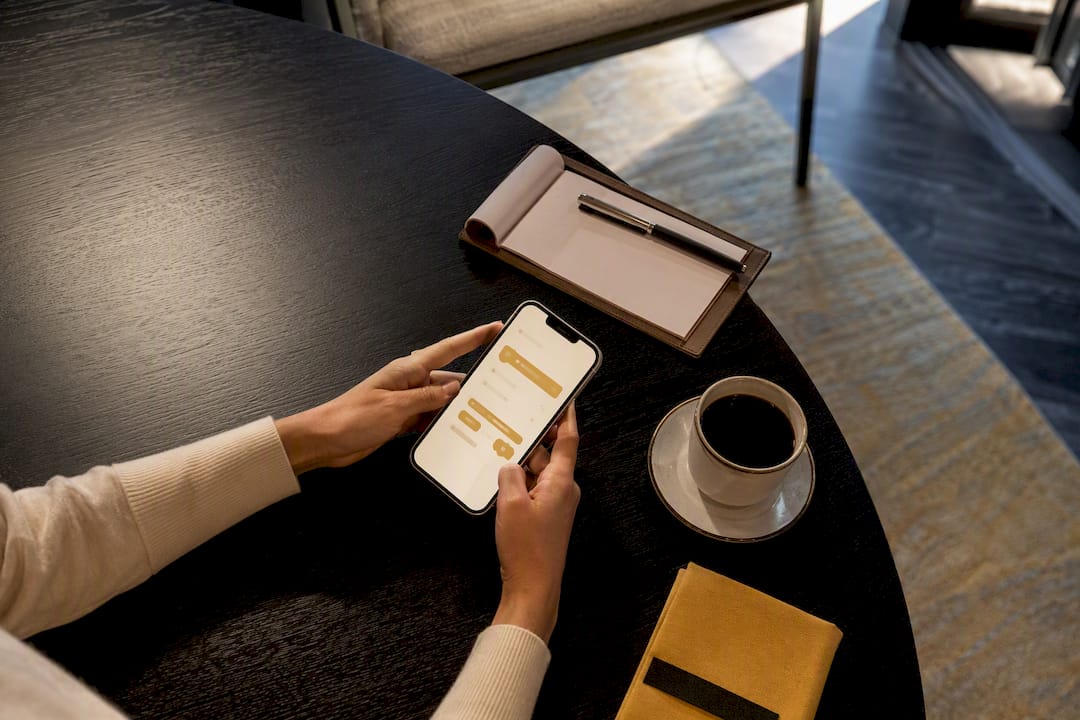
Mobile menu ordering lets guests scan a code or tap a link, browse your menu, order, pay, and pick up or receive their food without downloading an app or flagging down a server. Done right, it cuts phone traffic, speeds table turns, and hands you first-party guest data you can’t get from a delivery marketplace. The rest of this guide shows exactly how to set it up, from kitchen routing to payment options to the platform that makes it manageable.
TL;DR:
Using a single QR code or link for mobile ordering reduces menu updates and enhances customer access without app downloads.
Proper kitchen routing setup and real-time POS sync prevent order misfires and ensure orders reach the correct stations reliably.
Designing a simple, fast-loading menu with shallow categories and clear defaults improves conversions and reduces abandonment.
Integrating secure, PCI-compliant payment options and clear refund or cancellation policies minimizes errors and builds guest trust.
Collecting and analyzing order data helps optimize menu offerings, pricing, and staffing, turning mobile orders into ongoing customer relationships.
Table of Contents
How mobile menu ordering actually works, from scan to pickup
Every mobile ordering flow runs on the same backbone, whether a guest is sitting at table 12 or waiting in a hotel lobby. Access starts with a QR code, a short URL, or a link on your website — no app store, no download, no friction. A QR-code-driven menu keeps everything tied to a single, always-current link, so you’re never reprinting laminated menus when a price changes or the kitchen runs out of the salmon.
Once a guest lands on the menu, the sequence looks like this:
Browse and select — guests scan the code, open the digital menu, and pick items, adding modifiers like temperature, sides, or spice level.
Choose fulfillment — pickup, delivery to the table, or curbside, depending on what you’ve enabled.
Pay or open a tab — credit card, digital wallet, or a running tab tied to the table.
Confirm arrival if required — some venues use an “I’m here, prepare my order” trigger so the kitchen doesn’t start cooking until the guest actually shows up. Walt Disney World’s mobile ordering system uses exactly this pattern to cut down on cold food and wasted prep.
Kitchen routing — the order fires to a printer or kitchen display system, often through an auto-fire device that sends tickets straight to the right prep station.
Pickup or delivery — the guest gets a notification or a server brings the order to the table.
That last step, order routing, is where most setups succeed or fail. Get it wrong and tickets pile up at the wrong station or never print at all.
What mobile ordering actually does for your bottom line
The most immediate win is fewer interruptions, a benefit well illustrated in the role of online food ordering for restaurants and customers. Every phone call for a to-go order is a server or host pulled off the floor, and mobile ordering redirects that traffic to guests’ own screens. Focusing on mobile speed and a simplified ordering flow does more for your throughput than any staffing fix, because it removes the bottleneck instead of just working around it.
A few other effects show up fast once mobile ordering is live:
Higher average check. Suggested modifiers, combo prompts, and upsell placement on a digital menu perform better than a server’s verbal pitch, because guests browse at their own pace and see the option.
Direct guest data. Every order captures contact details and preferences you can use for loyalty and win-back campaigns, something third-party delivery platforms rarely hand back to the restaurant.
Commission avoidance. Marketplace delivery apps typically take a cut of every order. Direct mobile ordering through your own branded channel keeps that margin in-house.
Faster table turns. Guests who order and pay from their phone don’t wait on a check drop, which frees the table sooner during peak hours.
Pro Tip: Track how many mobile orders include an upsell item versus phone or in-person orders. The gap usually tells you exactly how much revenue you were leaving on the table before switching.
Your step-by-step mobile ordering setup checklist
Launching mobile ordering isn’t complicated, but skipping a step is how restaurants end up with orders stuck in limbo or a kitchen printer that never fires. Work through this sequence before you go live.
Pick your service mode. Decide between tabs (guests keep ordering and settle the bill at the end) and pay-as-you-go (each order is paid immediately). Toast’s Mobile Order & Pay setup treats this as the first configuration decision because it shapes everything downstream, including tipping and receipt flow.
Build your menu and set visibility rules. Assign items to dayparts, so breakfast doesn’t show up at 9 p.m., and control which service areas see which menu.
Generate and place your QR codes. Put them where guests naturally look: table tents, receipts, entryway signage, and your website’s ordering page.
Configure kitchen routing. Set up your auto-fire device or printer mapping so mobile orders land at the correct prep station automatically.
Test payment and tipping flows. Run a handful of test orders through every payment method you plan to offer.
Train staff, then soft-launch. Run it during a slower shift first so any routing or timing issues surface before a Friday night rush.
Pro Tip: Testing order routing before launch prevents the most common operational failure in mobile ordering. Toast’s own setup guidance recommends running a full test ticket through every prep station, not just the kitchen printer closest to the pass.
Designing a mobile menu that actually converts
A menu built for a laptop screen usually fails on a phone. Guests browsing on mobile abandon orders the moment navigation gets confusing or a modifier list runs too long, so every design decision should reduce taps, not add them.
Keep categories shallow: lunch, dinner, drinks, desserts, nothing buried three menus deep.
Cap modifier depth at what’s actually necessary; pre-select the most common combo as the default so guests aren’t building an order from scratch.
Use images and short video selectively on your best-selling or highest-margin dishes rather than every single item, which slows load time without adding value.
Add a reorder or favorites option for repeat guests, and keep allergen labeling short and scannable rather than buried in a footnote.
This lines up with what effective mobile ordering design consistently gets right: speed and clarity beat visual flourish. A mobile ordering experience built around fewer taps and clear defaults converts better than one stuffed with every possible customization option.
Getting payments and daily operations right
Live POS synchronization is the difference between a mobile menu that reflects reality and one that sells items you’re out of. When your menu and point-of-sale system share pricing and availability in real time, you avoid the awkward moment where a guest orders something the kitchen can’t make.
Enable Apple Pay and Google Pay alongside standard card payments; guests expect a one-tap checkout on mobile.
Support open tabs for dine-in and instant payment for takeout, matching the service mode you chose during setup.
Set realistic pickup windows and prep timing so mobile orders don’t collide with a sudden rush of walk-in tickets.
Clarify tip handling before launch, since digital tipping prompts affect both guest experience and staff payouts.
Pro Tip: Group orders create the most chargeback disputes in mobile ordering, usually because one person pays for items others didn’t actually receive. Build a clear split or itemized confirmation step to cut down on these disputes before they start.
How MyDigiMenu covers the checklist
Every step above maps directly to a MyDigiMenu feature. QR code generation and a scannable menu link handle guest access without an app download. Menu visibility rules let you control dayparting so breakfast items disappear at lunch automatically, and POS integrations keep pricing and availability synced so guests never order something the kitchen can’t deliver.
The platform also solves the parts of the checklist that tend to get skipped: rich food videos and photography for high-margin dishes, guest profile capture through social login for repeat-order marketing, and loyalty program tools that turn a single mobile order into a returning guest. For multi-location or international operators, built-in multi-language and multi-currency support means the same setup checklist works whether you’re running one dining room or several.
Accessibility features that matter for mobile ordering
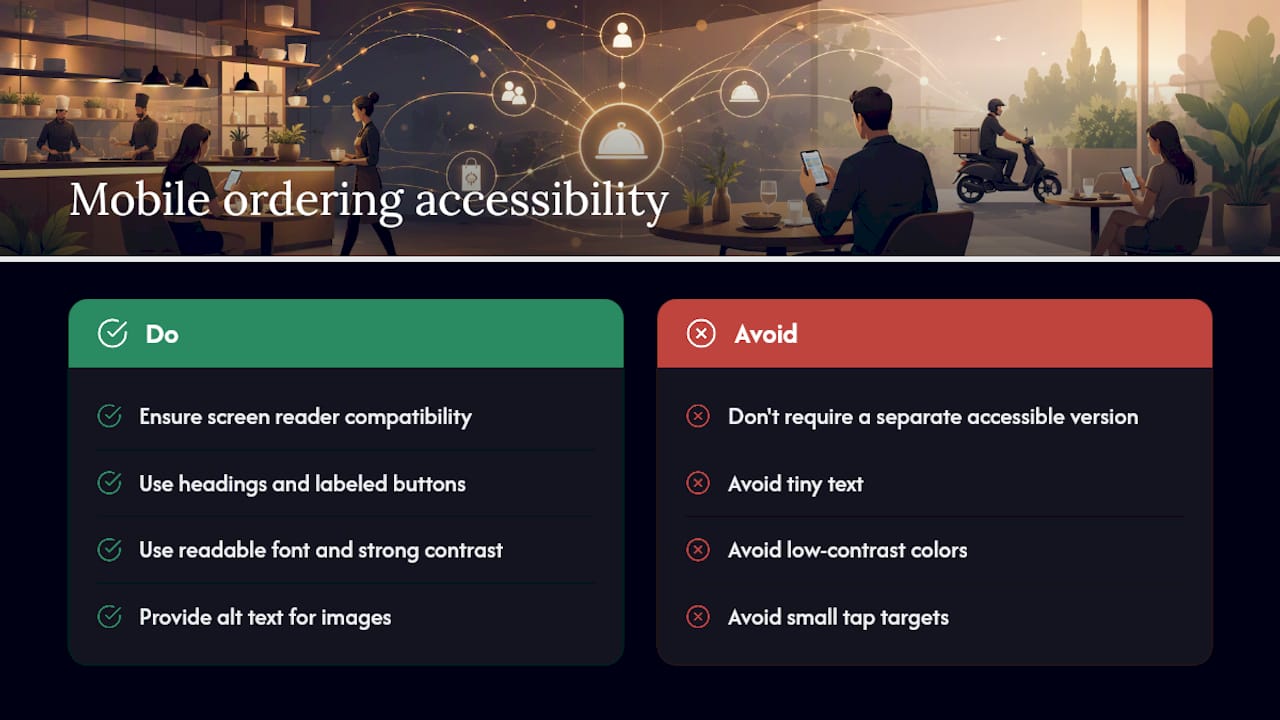
A mobile menu that only works for guests with perfect eyesight and steady hands isn’t actually mobile-friendly. Screen reader compatibility matters more than most operators realize, since a menu built with proper heading structure and labeled buttons allows guests using assistive technology to browse independently instead of asking a companion to order for them.
Font size and contrast deserve the same attention. Text set too small or in low-contrast gray-on-white forces guests to zoom and pinch, which slows ordering and increases abandonment, particularly for older guests or anyone ordering outdoors in bright sunlight. A menu with strong color contrast between text and background, and a base font size that doesn’t require zooming, serves every guest better, not just those with visual impairments.
Tap targets matter too. Buttons and modifier checkboxes need enough space around them that a guest with limited dexterity, or simply someone with larger fingers, doesn’t accidentally add the wrong topping. Alt text on food images helps screen reader users understand what they’re ordering when a photo is the primary way a dish is presented.
None of this requires a separate accessible version of your menu. Building these standards into the main mobile ordering flow from the start means every guest gets the same fast, frictionless experience, and you avoid the awkward scenario where accessibility becomes an afterthought bolted onto an already-live system.
Keeping guest payment data secure and private
Mobile ordering handles sensitive information every time a guest pays: card numbers, contact details, sometimes home addresses for delivery. PCI compliance isn’t optional here. Any platform processing card payments needs to meet Payment Card Industry Data Security Standard requirements, which govern how card data is transmitted, stored, and encrypted.
The safest approach for most restaurants is working with a mobile ordering provider that handles PCI compliance at the platform level rather than storing card data on restaurant-owned servers. This reduces your liability significantly, since you’re not the one holding sensitive payment information if a breach occurs elsewhere in the chain.
Guest privacy extends beyond payment data. Profile information collected through social login or loyalty sign-ups needs clear handling policies: what you collect, how long you keep it, and whether it’s shared with third parties for marketing. Guests are increasingly aware of how their data gets used, and a mobile ordering system that’s transparent about data handling builds more trust than one that quietly harvests information without disclosure.
Encryption in transit, secure tokenization for stored payment methods, and regular security audits aren’t glamorous topics, but they’re the foundation that makes guests comfortable typing a card number into a menu on their phone instead of handing a physical card to a server.
Handling order errors, refunds, and guest complaints
Mobile ordering removes a server from the transaction, which also removes the person who used to catch mistakes before they became complaints. A missing modifier, a wrong pickup time, or a payment that didn’t process correctly needs a clear resolution path that doesn’t require the guest to track down a manager in person.
The most functional systems build a direct communication channel into the ordering flow itself, so a guest with a problem can flag it immediately rather than calling the restaurant and waiting on hold. Refund and cancellation policies need to be visible before a guest orders, not discovered after something goes wrong. A guest who knows they can cancel within a short window after ordering is more likely to order confidently in the first place.
Staff training matters as much as the technology. Whoever monitors incoming mobile orders needs authority to issue a partial refund, remake a dish, or comp an item without escalating every single case to a manager. Slow resolution turns a minor kitchen mistake into a guest who never orders from you again, mobile or otherwise.
Cancellation windows also need to account for kitchen timing. A guest canceling an order that’s already fired to the kitchen creates food waste and wasted labor, so a clear cutoff, communicated at the point of order, protects both the guest experience and your prep costs.
Turning mobile orders into repeat business
Mobile ordering captures something a phone call never does: a guest profile you can actually market to. Every order tied to an account or a social login builds a picture of what that guest orders, how often, and at what times, which turns a one-time transaction into an ongoing relationship.
Loyalty programs work better when they’re built into the ordering flow rather than bolted on as a separate app or punch card. Digital stamp cards, point accumulation, and automatic reward triggers at checkout keep guests coming back without requiring them to remember a separate loyalty number. Personalized offers, sent based on a guest’s actual order history rather than a generic blast, tend to perform better because they reflect what that guest genuinely orders.
Timing matters as much as personalization. A guest who orders lunch every weekday responds differently to a promotion than someone who only shows up for special occasions, and a mobile ordering platform with CRM integration lets you segment those groups instead of treating every guest the same. Targeted campaigns tied to order history, birthday offers, win-back promotions for guests who haven’t ordered in a month, consistently outperform broad discount blasts sent to everyone on your list.
The goal isn’t just repeat orders. It’s building a direct relationship with guests that doesn’t depend on a third-party marketplace controlling access to your own customer base.
Using order data to sharpen your menu and pricing
Every mobile order generates data most restaurants never fully use: what sells at what time, which modifiers guests actually choose, and where they abandon an order before completing it. That data answers questions a paper menu never could.
Order pattern analysis reveals which items perform well at lunch but flop at dinner, informing dayparting decisions with real numbers instead of guesswork. Modifier data shows whether your upsell prompts are actually converting or just cluttering the screen. Abandonment data, tracking where in the ordering flow guests give up, often points to a confusing menu structure or a checkout step that’s asking for too much information.
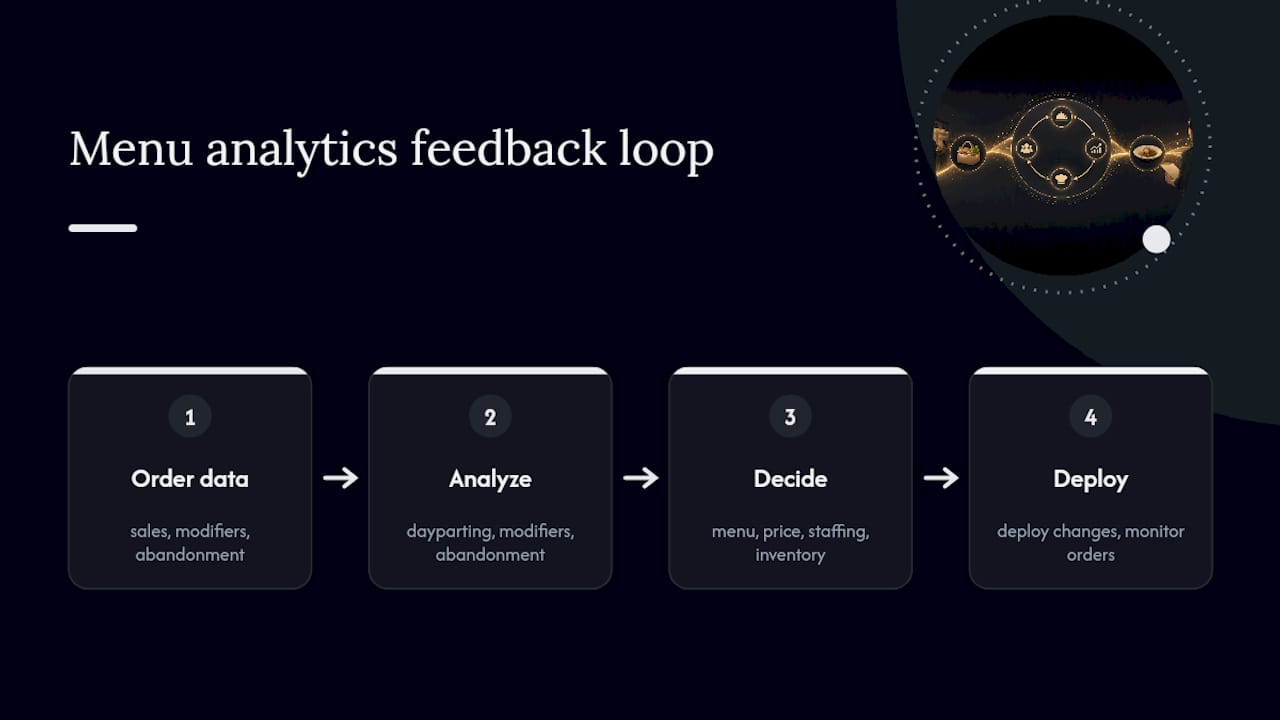
Pricing decisions benefit from the same visibility. If a high-margin item consistently underperforms, the problem might be placement rather than price, and menu analytics can show whether moving it earlier in the browsing flow changes behavior. Seasonal and time-of-day reporting also helps with staffing and inventory planning, since a restaurant that knows exactly when mobile order volume spikes can schedule kitchen staff accordingly instead of reacting after the rush already hit.
The restaurants getting the most out of mobile ordering treat the data as an ongoing feedback loop, adjusting menu layout and pricing every few weeks rather than setting it once and leaving it untouched for a year.
What actually trips up mobile ordering launches
The failures I see most often aren’t technology problems, they’re sequencing problems. Printer routing gets configured last instead of first, modifier lists balloon because nobody set a cap, and restaurants skip testing entirely because the soft-launch felt like an unnecessary delay before a busy weekend.
The highest-return fixes are almost embarrassingly simple: a single QR code that works everywhere instead of five different links, Apple Pay enabled from day one, and combos pre-built so guests aren’t assembling an order item by item. Get those three things right before worrying about anything else.
— Abhi
Getting started with MyDigiMenu
If you’ve read this far, you already know the setup checklist. What you need next is a platform that supports QR code ordering, live menu updates, and POS integration without hiring a developer to stitch it together.

The platform handles key challenges: generating QR codes tied to specific tables or service areas, syncing menu changes in real time, and layering in loyalty tools and guest profile capture to help build toward repeat customers. Multi-language and multi-currency support suits both single and multi-location operations.
Start by exploring the QR menu generator to see how quickly you can get a live, scannable menu in front of guests, then check out the full digital menu platform for the loyalty, reservation, and CRM features that turn mobile ordering into an ongoing guest relationship rather than a single transaction.
Sources
Recommended
Una consulta sencilla puede ahorrar tiempo cuando se buscan resultados recientes. Tu Chance Hoy puede orientar a los lectores hacia información relacionada con los sorteos. Me parece positivo que los sitios publiquen datos fáciles de entender y recomienden verificar cualquier resultado directamente en los canales oficiales de cada lotería.
Solid breakdown of mobile ordering ops — especially the kitchen routing and real-time POS sync points. Getting those right is what actually keeps orders from going sideways during peak hours. On a totally different note, if anyone needs a quick mental reset after a busy shift, Kart Bros has been my go-to for a few fast races.