
Best tableqr.co Alternatives for Restaurants in 2026

For operators who need more than a static QR link, Mydigimenu is the recommended all-in-one alternative to TableQR, covering QR menus, tablet ordering, POS integration, loyalty programs, and guest analytics in a single platform. Two other lanes are worth knowing: lightweight free QR generators for view-only menus, and enterprise QR/ordering platforms for large chains with advanced analytics needs.
TL;DR shortlist:
Best all-in-one pick: Mydigimenu — QR ordering, pay-at-table, POS integration, loyalty, and multilingual support; plans start with a free tier and scale by feature set.
Best for view-only menus: Free static QR builders (no ordering, no analytics, no monthly cost).
Best for enterprise chains: Platforms with governance, SSO, and bulk QR management built for multi-location operations.
Next step: Book a Mydigimenu demo to test the full ordering flow and POS connection before committing to any platform.
Pro Tip: If your menu changes more than once a week, a free static QR code will cost you more in reprint labor than a paid dynamic platform. Factor in staff time, not just the subscription fee.
Table of Contents
Which tableqr.co alternatives should you actually compare?
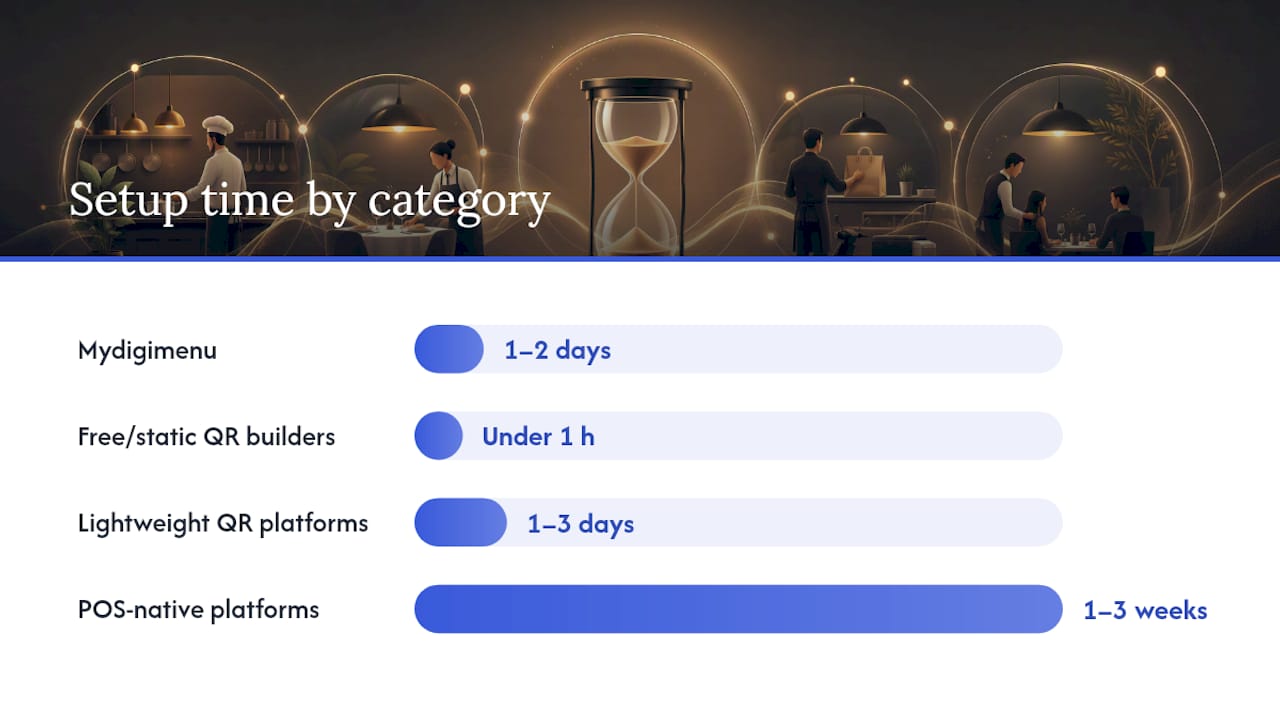
The table below maps the most decision-critical dimensions across solution categories. “Starting price shape” refers to whether a platform offers a free tier, a low fixed monthly rate, or custom/enterprise pricing that requires a sales call.
Solution category | Best for | Ordering & payments | Branding flexibility | POS integration | Starting price shape | Setup time | Analytics & guest data | US availability |
Mydigimenu ⭐ | Independent restaurants, cafes, hotels wanting all-in-one | QR ordering, pay-at-table, full payments | High — custom layouts, food video, logo | Yes — third-party POS + delivery platforms | Free tier available; paid plans scale by features | 1–2 days self-serve; managed onboarding available | Guest profiles, loyalty, CRM, feedback | ✓ |
Free/static QR builders | View-only menus, print assets, pop-ups | View-only (no ordering) | Moderate — color/logo on code only | None | Free forever | Under 1 hour | None | ✓ |
Lightweight QR menu platforms | Cafes and fast-casual needing simple order capture | Basic ordering; limited payment flows | Moderate | Limited or none | Low monthly (free tier available) | 1–3 days | Basic order data | ✓ |
POS-native platforms with QR features | Operators already locked into a POS ecosystem | Full ordering + payments via POS | Low — POS-branded UI | Native (same vendor) | Mid-to-high monthly or % per transaction | 1–3 weeks | POS-level reporting | ✓ |
Enterprise QR/analytics platforms | Multi-location chains, branded campaigns | Varies; analytics-first | High — custom domains, landing pages | API-based | Custom/enterprise | 2–6 weeks | Advanced scan analytics, SSO, governance | ✓ |
Bulk/printing QR services | Hotels, events, large-format print runs | None | Low | None | Free to low | Under 1 day | None | ✓ |
According to Fit Small Business’s expert roundup, the right QR tool depends heavily on whether you need dynamic tracking, design quality, or bulk generation — a single platform rarely wins on all three. Mydigimenu is the exception for hospitality operators because it pairs dynamic QR with a full ordering and guest-engagement stack.
How do you pick the right lane for your operation?
The fastest way to narrow your options is to match your primary outcome to a solution type.
Choose view-only QR if your menu is stable, you only need guests to browse, and you have no interest in capturing order data. A tool like QRCode Monkey generates high-resolution vector codes with embedded logos at no cost — ideal for printed table cards or window signage.
Choose QR + ordering if you want guests to place orders from their phones without a server relay. This lane requires dynamic QR support, a payment gateway, and some form of order management. Mydigimenu sits here with full pay-at-table capability and contactless ordering built in.
Choose POS-integrated ordering if your kitchen already runs on a POS system and you need orders to route directly to that system without manual re-entry. Expect a longer setup window and higher monthly cost, but tighter operational control.
Signals that tip the decision:
Daily menu or price changes → dynamic QR is mandatory; static codes cannot be updated after printing.
Average check above $40 → pay-at-table and upsell media (food video, item photography) pay for themselves quickly.
Multiple locations → centralized menu management and analytics become non-negotiable.
Guest loyalty goals → you need profile capture and a CRM layer, not just a QR link.
Pro Tip: A free QR generator becomes a false economy the moment you need to update a price, add a seasonal item, or track which table scanned most. At that point, the reprint cost and lost data outweigh any subscription savings.
Profiles: Mydigimenu and the main alternative categories
Mydigimenu
What it is: A hospitality-first SaaS platform covering QR menus, tablet and mobile app ordering, pay-at-table, POS and delivery platform integrations, loyalty programs, guest profile capture via social login, and multi-language/currency support.
Best for: Independent restaurants, cafes, bars, and hotels in the US that want a single platform to handle the full guest journey from menu browse to payment.
Key strengths: High-quality food video support, customizable menu layouts, digital gift vouchers, nutritional information display, CRM-linked marketing campaigns, and a free tier that lets operators test the platform before committing. Mydigimenu also supports cryptocurrency payments and reservation management, features that most QR-only tools do not offer.
Tradeoffs: Operators who only need a static view-only menu will find the feature set larger than they need. The full POS integration setup takes longer than a simple QR link.
When to pick it: When you want ordering, payments, loyalty, and analytics in one place without stitching together three separate tools.
Free/static QR and design-first QR builders
These tools generate a QR code that points to a fixed URL. Adobe Express creates free static codes with color and logo customization, and qrcode.io offers PNG and SVG downloads with no account or watermark required. Neither supports ordering, analytics, or dynamic redirects.
Ordering & payments: None. Branding: Moderate (code design only). Setup: Under one hour. Price: Free.
The critical limitation: static QR codes cannot be updated after printing. If your menu changes, you reprint. For a stable, single-page menu at a pop-up or seasonal stall, that is perfectly fine. For a full-service restaurant with weekly specials, it becomes a recurring operational headache.
Lightweight QR menu platforms with simple ordering
This category covers platforms that host a digital menu and accept basic orders, typically without deep POS routing. Setup is fast (often under three days), monthly costs are low, and the feature set is intentionally narrow. They work well for fast-casual spots that want to reduce server touchpoints without overhauling their tech stack.
Watch-out: Many in this category charge per-transaction fees that add up quickly at higher volumes. Always ask for the total cost at your expected monthly order count, not just the headline monthly rate.
POS-native platforms with QR features
Toast, Square for Restaurants, and Lightspeed Restaurant all offer QR ordering as a feature layer on top of their core POS product. The advantage is native integration: orders flow directly into the kitchen display without a middleware step. The tradeoff is lock-in. Branding flexibility is limited to what the POS vendor allows, and switching later means migrating your entire order history and menu structure.
Best for: Operators who are already committed to one of these POS ecosystems and want QR ordering without adding a separate vendor.
Enterprise QR/analytics platforms
Platforms like Hovercode offer editable dynamic QR codes with scan analytics, custom redirect domains, landing pages, and team management features. For a branded chain running location-specific campaigns, that governance layer (workspaces, SSO, bulk generation) matters. For a single-location bistro, it is more infrastructure than the operation needs.
Pro Tip: If you manage more than five locations, look for a platform that supports workspace-level permissions so individual managers can update their menus without touching another location’s data.
Bulk/printing-oriented QR services
For hotels running in-room dining cards, event venues printing table numbers, or catering companies needing hundreds of codes at once, bulk QR generation is the priority. OhMyQR renders codes locally in the browser (no server upload) and supports bulk CSV processing, which matters when the QR content includes internal URLs or WiFi credentials you prefer not to transmit to a third-party server. Abundera supports 175+ QR and barcode types, including regional payment formats like PIX and ZATCA, useful for properties with international guests.
What should you ask vendors before you buy?
Run every candidate through this checklist before signing anything.
Vendor screening checklist:
Does the platform support dynamic QR codes with editable redirects?
Are payments processed via a PCI-compliant gateway, and who handles chargebacks?
Which POS systems does it integrate with natively, and which require a third-party middleware?
Who owns the guest data — you or the vendor? Can you export it in full at any time?
Does it support multiple languages and currencies out of the box?
What security certifications does the platform hold (SOC 2, ISO 27001)?
Questions to ask during demos:
What is your average onboarding timeline for a single-location restaurant?
What is your support SLA for critical issues (ordering down, payment failure)?
Can I use a custom domain or white-label the guest-facing interface?
How are refunds and chargebacks handled, and who bears the liability?
What happens to my data if I cancel — how long is it retained, and in what format can I export it?
Is there an open API, and which third-party delivery platforms are pre-integrated?
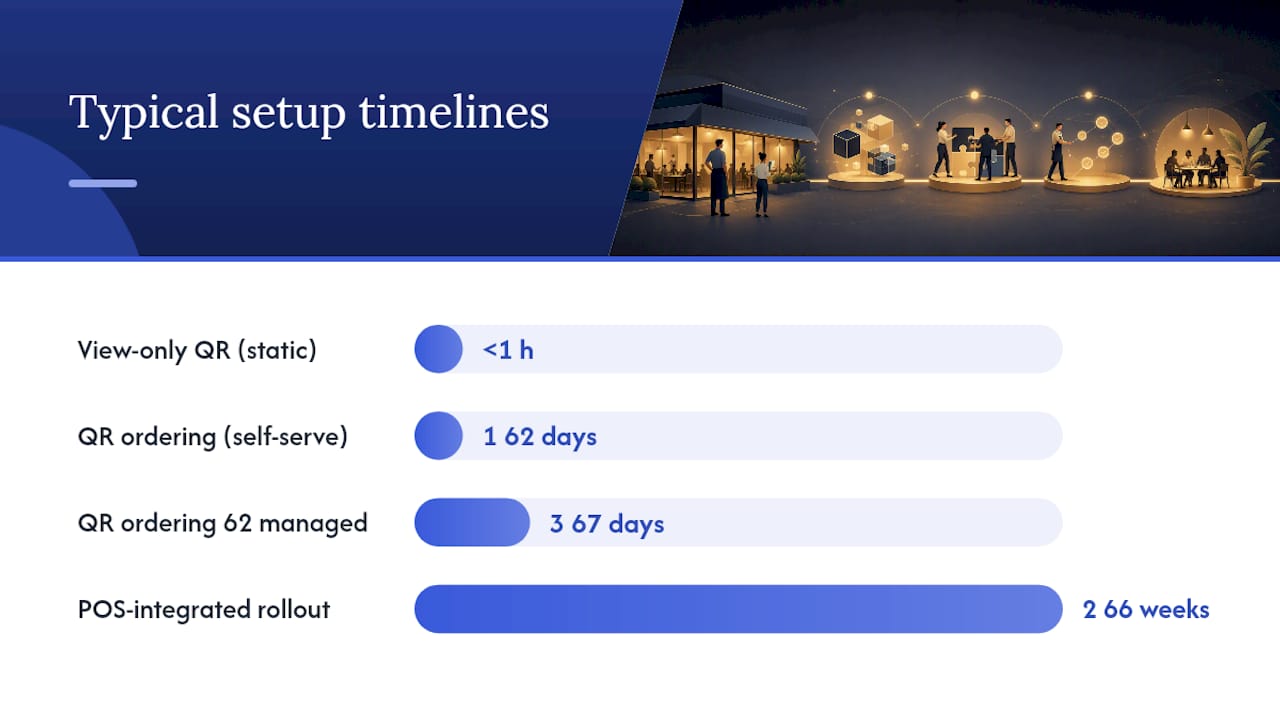
Typical setup timelines:
View-only QR (static): under one hour, self-serve.
QR ordering with payments (self-serve): 1–2 days.
QR ordering with managed onboarding: 3–7 days.
POS-integrated rollout: 2–6 weeks depending on POS complexity and menu size.
Red flags to walk away from:
No dynamic QR support (you will reprint every time a price changes).
No data export option (your guest list is held hostage).
Undisclosed transaction fees that only appear in the contract, not the pricing page.
“No integrations” with no API fallback — a closed system that cannot connect to your existing tools.
Pro Tip: Ask the vendor to run a live test order during the demo, including a payment and a refund. A platform that hesitates on a live demo is telling you something about its production reliability.
What are the different types of digital menus?
Not all “QR menus” are the same thing, and confusing the types leads to buying the wrong platform.
Static/view-only QR: A QR code that opens a PDF or web page. Guests browse but cannot order. No data is collected. Works for operators who want to eliminate printed menus without changing their service model.
Dynamic QR landing pages: A QR code that points to a hosted, editable menu page. The URL stays the same; the content behind it can be updated without reprinting. This is the minimum viable option for any restaurant with a menu that changes regularly.
QR ordering with merchant payments: Guests scan, browse, add items to a cart, and pay from their phone. The operator receives the order in a dashboard or POS. This is where platforms like Mydigimenu operate, and it is the type most operators mean when they say “QR ordering.”
Pay-at-table flows: A variation where the guest’s bill is presented digitally and settled by card or digital wallet at the table, without waiting for a server to bring a terminal. Reduces table turn time and improves the guest experience at high-volume venues.
POS-integrated ordering ecosystems: The full stack — QR ordering routes directly into the kitchen display, inventory adjusts in real time, and reporting consolidates across locations. Toast, Square for Restaurants, and Lightspeed Restaurant operate in this space, as does Mydigimenu through its third-party POS integrations.
Dynamic QR is mandatory when menu content changes frequently or when you need scan analytics to understand which items drive the most engagement. A static code is a one-way broadcast; a dynamic platform is a two-way conversation with your guests.
For a deeper look at where contactless dining is heading in 2026, the shift from view-only to full ordering ecosystems is accelerating across independent and chain operators alike.
Why Mydigimenu stands out as a recommended alternative
Mydigimenu covers the full hospitality use case in a way that most QR-only tools and POS-native add-ons do not. The feature set includes QR and tablet menus, mobile app ordering without a guest app download, pay-at-table, POS and delivery platform integrations, high-quality food video, guest profile capture via social login, loyalty programs with digital stamp cards, CRM-linked marketing, digital gift vouchers, nutritional information, and support for multiple languages and currencies. That breadth matters because it means operators are not stitching together a QR tool, a loyalty app, and a separate analytics dashboard.
Two use cases illustrate the practical difference. An independent bistro with a typical nightly service can use Mydigimenu’s food video feature to surface high-margin desserts and cocktails at the point of ordering, driving average check growth without adding staff. A hotel F&B team can deploy in-room dining QR codes that route orders directly to the kitchen, capture guest preferences for the CRM, and present the menu in the guest’s preferred language — all from one platform.
Mydigimenu is available in the US market with USD pricing. The QR menu product page covers the full feature list, and USD pricing plans show the free tier alongside paid tiers so operators can compare cost against their current setup.
For hotel-specific selection considerations, the Wild Foodz analysis of menu platform alternatives for hotels and cafes offers useful context on what hotel F&B teams prioritize differently from restaurant operators.
Pro Tip: Use Mydigimenu’s food video feature on your top three high-margin items first. Operators consistently report that visual media on a digital menu shifts ordering behavior faster than any discount or promotion.
Key Takeaways
Mydigimenu is the strongest all-in-one alternative to TableQR for U.S. hospitality operators who need QR ordering, payments, POS integration, and guest analytics in a single platform.
Point | Details |
Match platform to outcome | View-only needs a free static QR builder; ordering and payments need a dynamic platform with a payment gateway. |
Dynamic QR is non-negotiable for active menus | Static codes cannot be updated after printing, making them costly for menus that change regularly. |
Ask about data ownership upfront | Confirm you can export all guest data in full before signing any contract. |
POS-native QR means vendor lock-in | Toast, Square, and Lightspeed QR features work best when you are already committed to that POS ecosystem. |
Mydigimenu covers the full stack | QR ordering, pay-at-table, loyalty, food video, POS integration, and multilingual support in one platform with a free tier to start. |
The part most operators get wrong about QR menu selection
Most operators evaluate QR platforms the way they evaluate a printer: can it produce the output I need today? That framing misses the real question, which is what the platform lets you do with guest behavior over time.
A static QR code tells you nothing. A dynamic platform with analytics tells you which items get the most views, which ones convert to orders, and which tables scan most often. That data is the foundation of a real upsell strategy, a loyalty program that feels personal, and a marketing campaign that targets guests who actually visited rather than a generic email list.
The operators who get the most value from platforms like Mydigimenu are not the ones who set it up and walk away. They are the ones who treat the menu as a live sales tool, updating item photography, testing item placement, and using the CRM layer to bring guests back. The technology is the enabler; the operator’s intent is what makes it work.
Choosing a platform that can grow with that intent, rather than one that only solves today’s “we need a QR code” problem, is the decision that pays off over a full season rather than just a single weekend.
Mydigimenu: a practical next step for operators ready to move
Operators who have spent time comparing similar sites to tableqr.co often reach the same conclusion: the platforms that look cheapest upfront tend to charge the most in operational friction, reprint costs, and lost guest data over time. Mydigimenu offers a different path — a hospitality-focused platform where the free tier is a genuine starting point, not a stripped-down teaser.

The demo covers the end-to-end ordering flow, live POS integration on a test order, analytics dashboard, and loyalty setup. You can also start on the restaurant digital menu and tablet ordering platform directly and run a live pilot on a single shift before rolling out to the full floor. Visit mydigimenu.com to check availability for your location and book a walkthrough with the team.
Useful sources for further reading
Recommended
Es positivo encontrar contenido que prioriza la exactitud y evita generar expectativas irreales. La lotería nacional puede consultarse con mayor tranquilidad cuando los resultados publicados están claramente identificados y se explican de forma comprensible.
I really like how easy BaseballBros is to jump into. No massive installation or complicated setup is standing between you and the action. Open the browser, start a match, and you can be swinging for the fences almost immediately.